10 UGC creator mistakes beginners make (and how to fix them)
Skipping briefs, wrong aspect ratios, no watermarks on spec work — these UGC creator mistakes cost you deals. Here's what to fix before your next pitch.

My first UGC video got rejected before the brand even watched it. Wrong aspect ratio. I'd filmed everything in landscape, sent over a 16:9 file, and the media buyer replied in about four minutes flat: "Hey, we need vertical." Back to square one.
That one rejection taught me more than any tutorial. The ugc creator mistakes beginners make aren't usually about talent — they're about process. And most of them are completely avoidable once you know what brands are actually looking at.
If you're just getting started, read how to become a UGC creator: the complete guide first — it covers the full picture. This post focuses specifically on the errors that quietly kill deals before they even start.
Here are the ten I see most often.
Mistake #1: Wrong aspect ratio (the fastest way to get rejected)
9:16. That's it. That's the format for TikTok, Reels, and Shorts — the three platforms eating the majority of brand ad spend right now.
Filming in 16:9 (standard landscape) and then cropping it after doesn't fix it. You lose resolution, you lose framing, and the product that was carefully centered in your shot is now cut in half. Brands working with media buyers at scale can't use that footage. They just move on.
The fix: Change your phone camera to 4K resolution at 9:16 before you film anything. Set it once. Check your phone settings for filming UGC videos if you're not sure where to find it — it varies by device.
Mistake #2: Ignoring the brief (or barely reading it)
A brand sends you a brief. You skim it, film something that feels right, and submit. The revision request comes back two days later asking why you didn't mention the hero ingredient, why the hook doesn't match the angle they specified, and why there's no text overlay on the CTA.
That's three revision cycles before you've even started. Some brands have a limit of two. You've now burned your goodwill and your deadline.
Read the brief twice. Highlight every requirement. Check deliverables, hook direction, key messaging, platform specs, and revision limits before you film a single second. A 10-minute investment upfront saves you hours of reshooting.
Mistake #3: Sending spec work without a watermark
You filmed a spec video for a skincare brand. It's good. You send it over to show them what you can do. They love it. Then they ghost you — and two weeks later it's running as an ad.
This happens. Not with every brand, but often enough to be a real risk. Spec work (content you create to pitch yourself, before a contract is signed) should always have a subtle but visible watermark. Your name, your handle, or your website URL in a corner.
Once there's a signed contract and a deposit in your account, you send the clean file. Not before.
Mistake #4: Under-delivering on the deliverables
"3 videos" sounds simple. But brands often mean: 3 videos, each with 2–3 hook variations, edited for both TikTok and Reels specs, with and without captions, plus raw B-roll footage.
If you didn't ask — and they didn't specify — that ambiguity will cost you. Either you've under-delivered and the client is frustrated, or you've massively overworked yourself on a flat rate.
Before filming anything, confirm the full scope in writing:
- Number of final videos
- Hook variations per video
- Platforms (does Reels need different spec than TikTok?)
- Caption/text overlay requirements
- Raw file delivery or edited only
- Revision rounds included
A quick email confirming scope takes five minutes. Renegotiating after delivery is painful for everyone.
Mistake #5: Filming in terrible lighting and calling it "authentic"
"Authentic" doesn't mean dark, grainy, and underexposed. Brands want content that looks real — not content that looks accidental. There's a difference.
Natural light from a window is free and genuinely good. A $25 ring light from Amazon fills shadows. Neither costs much. What costs you is submitting footage where the product is barely visible because you filmed at 9pm in a yellow-lit bedroom.
The bar is: lit well enough that someone scrolling at 2x speed can see the product clearly. That's it. You don't need a studio. Check out our guide on UGC creator equipment for the exact setup that gets the job done without overspending.
Mistake #6: Filming horizontally "just in case"
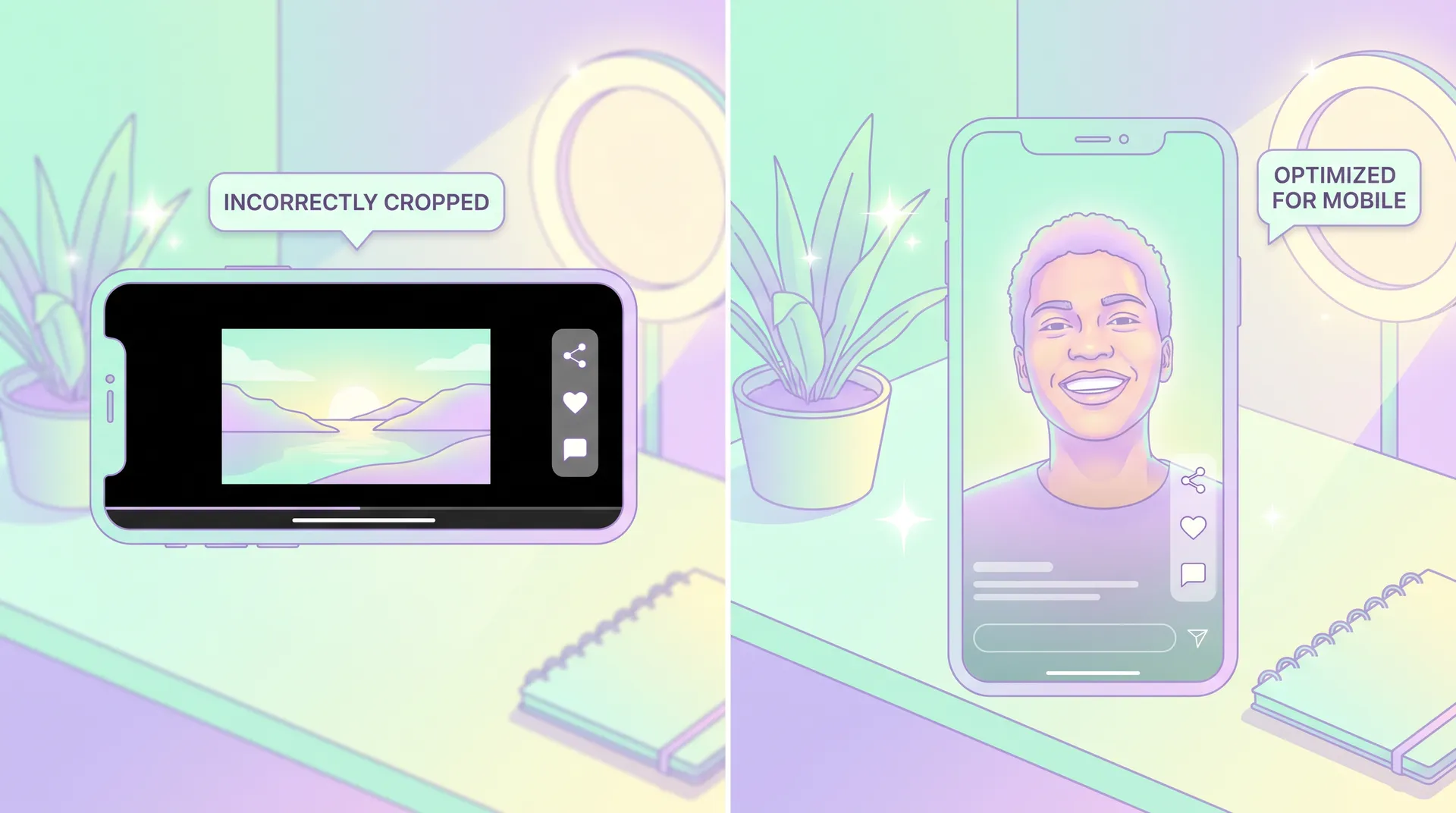
Closely related to mistake #1, but slightly different. Some beginners film everything in landscape thinking they can crop later, or that brands might want a 16:9 version. Sometimes that's true — but 90% of briefs you'll see are specifying vertical-first content.
Filming horizontal by default means you're working against yourself from frame one. If a brand does need horizontal, they'll tell you. Default to vertical unless the brief explicitly says otherwise.
Mistake #7: Not asking questions before filming
A brief lands in your inbox. You think you understand it. You don't ask anything. You film.
Then you find out they wanted the hook delivered to-camera, not voice-over. Or they wanted the product unboxed, not already open. Or they needed you to avoid mentioning a specific competitor (which their brief mentioned in a footnote you missed).
The best creators I've seen ask 3–5 clarifying questions before they start. Not 20 — that's annoying. But targeted, smart questions that eliminate ambiguity. Something like: "Should the hook be on-camera talking head or voice-over? Do you want the packaging shown? Any competitors or claims to avoid?"
Brands respect this. It signals professionalism, not inexperience. See our guide on how to read a UGC campaign brief for the types of questions worth asking.
Mistake #8: Pricing without usage rights included
You charge $150 per video. Brand runs it as a paid Meta ad for six months. That video generates $400,000 in revenue. You got $150.
UGC usage rights aren't a negotiation tactic — they're a legitimate part of the fee structure. Organic usage (posting on a brand's social page) is one price. Paid ad usage is higher. Whitelisting (running ads from your account) is higher still. Duration matters too — 30 days is very different from perpetuity.
If you don't know how to structure this yet, start by reading about UGC licensing fees. Don't leave it until after you've already sent a quote.
Mistake #9: Treating every format the same
A 60-second talking-head testimonial doesn't work on TikTok the same way it works as a YouTube pre-roll. A product unboxing that kills on Reels might need a completely different hook structure as a Meta dark post. Platforms aren't interchangeable.
According to Meta's own research, video ads designed natively for mobile outperform repurposed content significantly. Creators who understand platform-specific differences — hook length, caption style, pacing — consistently get higher creative approval rates.
If you're not sure what formats work where, start with the UGC video formats brands actually buy breakdown before your next shoot.
Mistake #10: Giving up after the first rejection
One revision request, one piece of critical feedback, one "this doesn't quite work for us" — and some creators disappear. They decide they're not good enough and stop pitching.
Rejection is part of the job. Even experienced creators get revision requests. Even solid pitches get ignored. According to a survey by Influencer Marketing Hub, brands evaluate 5–10 creators before choosing one for a single campaign. Not getting picked doesn't mean your content was bad — it often just means fit wasn't right.
What separates creators who build a real business from those who don't is what they do after the rejection. They ask for feedback, adjust, and pitch again. That's it.
If you're still building momentum and need help framing your approach, how to start UGC with no following and no experience is worth a read. The patterns that work early on are the same ones that scale.
One more thing worth flagging
Audio. Beginner UGC content almost always has lighting sorted before audio — but bad audio tanks conversion rates just as fast as bad lighting. Studies on video engagement consistently show that viewers will tolerate imperfect video quality before they'll tolerate distorted or echoey sound.
Film in a quiet room. Get close to your mic. That's 80% of the fix right there. The rest is your phone settings and environment.
Frequently Asked Questions
What are the most common UGC creator mistakes beginners make?
What aspect ratio should UGC videos be?
Should I watermark spec UGC videos I send to brands?
How do I avoid UGC revision requests?
Do UGC creators need to charge for usage rights?
How long does it take to land your first UGC deal after making these mistakes?
Related reading
- How to become a UGC creator: the complete guide
- How to film your first UGC video (practice shoot guide)
- UGC creator equipment: what you actually need (and what you don't)
- Best phone settings for filming UGC videos
- UGC video formats brands actually buy (with examples)
- How to start UGC with no following and no experience
- How long to get your first UGC paycheck (honest timeline)