How to batch UGC content using AI tools (full workflow)
Learn how to use AI tools for UGC content batching — from ideation to delivery — so you can film multiple brand deliverables in one shoot day.

I once filmed 11 UGC deliverables in a single afternoon. Three brands, four products, multiple hooks per video. My editor had everything by 6pm. That used to take me a week.
The difference wasn't working harder. It was building a proper UGC content batching workflow with AI tools running through every stage — ideation, scripting, filming prep, editing, and delivery. Once that system was in place, the math on my business completely changed.
If you're still filming one brand campaign at a time, rewriting scripts from scratch each week, and spending hours in post for two or three deliverables — this is the post that's going to fix that.
What UGC content batching with AI tools actually means
Batching isn't just "film a lot in one day." That's the output. The real work happens before you press record.
True batching means your entire production pipeline — from the first creative brief to the final file delivery — is built so that one block of focused time produces everything across multiple brand campaigns at once. AI tools are what make that actually possible at scale.
Without AI, batching breaks down fast. You'd spend two hours writing scripts, another hour building shot lists, then get to your shoot day totally frazzled. The cognitive load kills your performance on camera.
With AI, you compress that pre-production work from hours to maybe 30–45 minutes across five brand deliverables. That's the actual unlock.
Here's how I break the workflow into five stages — and where AI does the heavy lifting at each one.
Stage 1: Ideation — build your creative brief stack
Before anything else, I pull up all my active brand briefs and run them through a single ChatGPT session. Not one at a time. All of them together.
The prompt I use extracts three things per campaign: the core hook angle, the product benefit I need to communicate, and a secondary "emotional beat" (trust, curiosity, FOMO — whatever fits the brand's tone). Ten minutes of prompting gives me a full creative brief stack for every campaign in my pipeline.
This is way faster than reading each brief separately and trying to brainstorm in isolation. AI is just better at pattern-matching across multiple inputs at once. Check out ChatGPT prompts every UGC creator should use in 2026 for the exact prompt frameworks that work best here.
One thing I always do: I input the brand's existing ad copy, their Instagram bio, and two or three product reviews from their website. The AI uses that as raw material and the output is 10x more on-brand than if you just describe the product from memory.
Stage 2: Scripting — generate, vary, and approve
This is where AI saves the most time. Not because it writes perfect scripts — it doesn't — but because it gets you from blank page to a workable draft in under two minutes per script.
My process: generate three variations per video. Each one leads with a different hook style — one direct claim, one question, one relatable scenario. I pick one or combine the best elements from two of them. The whole thing takes maybe five minutes per deliverable.
For a batching workflow, I'm scripting everything for all brands in one sitting. Five brands, two deliverables each — that's ten scripts drafted in under an hour. Before AI? That was easily a half-day job. How to use AI writing tools for UGC scripts faster goes deep on structuring that prompting workflow.
Also: don't sleep on generating multiple hook variations for the same script. I cover this in more detail in how to use AI to create UGC script variations for split testing — brands love when you deliver two hook options upfront. It saves revision rounds and makes you look professional.
The one thing AI consistently gets wrong is tone. It tends to write scripts that sound polished and vague at the same time. I always do a pass to punch in specificity — a real price point, a real use-case scenario, a reaction that sounds like how I actually talk.
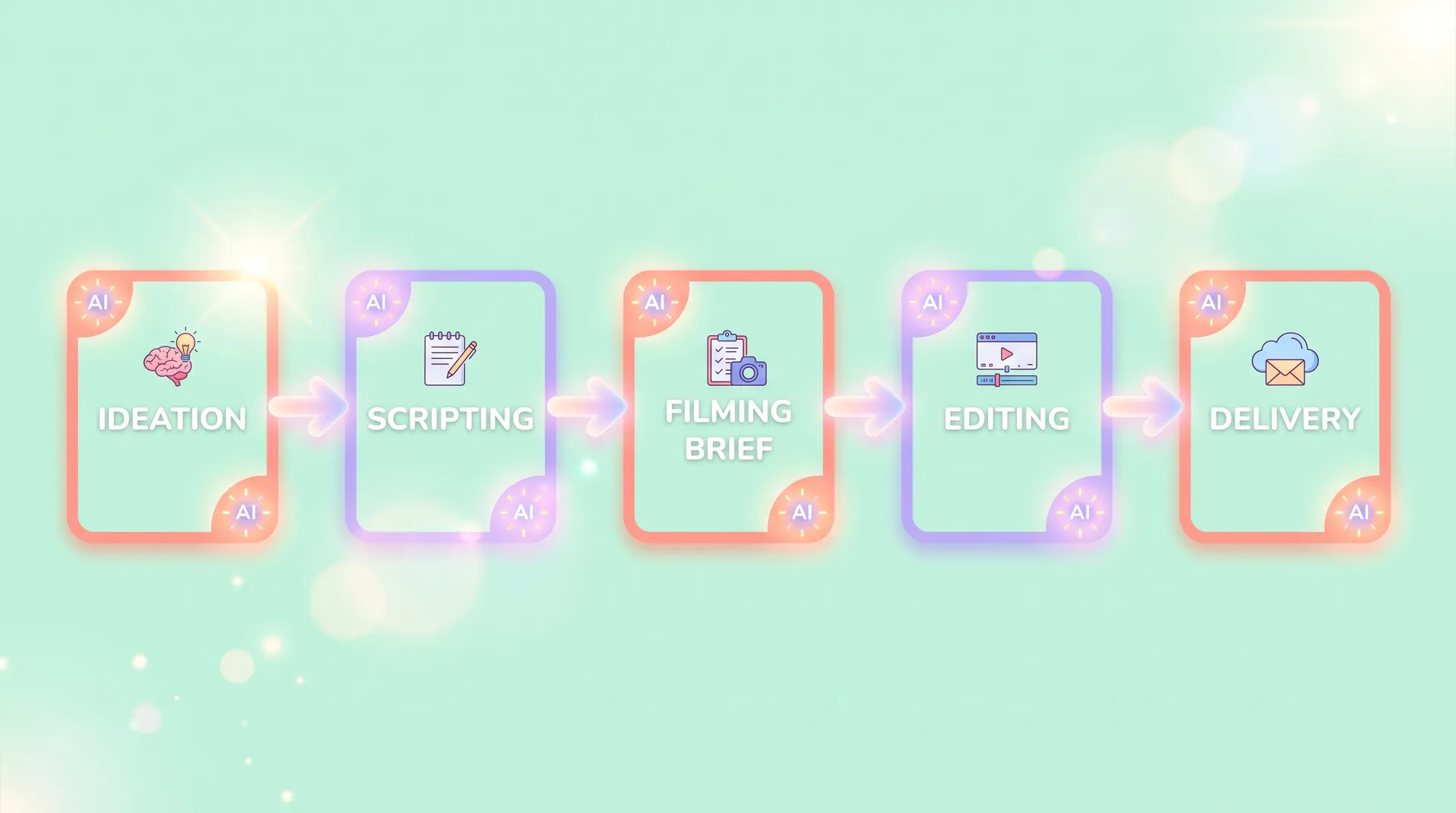
Stage 3: Filming briefs — build your shoot day like a director
Most creators skip this step entirely. That's why their shoot days run long and chaotic.
A filming brief is basically a production sheet for yourself: what you're wearing, what props you need, which backdrop, which lighting setup, the exact sequence you're filming in. When you batch across three or four brands in a day, this document is the only thing standing between a smooth shoot and a total mess.
I use AI to generate these briefs automatically from the scripts. The prompt is simple: "Based on this script, give me a shot-by-shot filming checklist including recommended props, setting, wardrobe notes, and talent direction cues." Takes about 30 seconds per video.
Then I group all my clips by setup. Every shot that uses the kitchen? Done back-to-back. Every shot that uses the bedroom backdrop? Same. You'd be amazed how much time you save not constantly rearranging your space.
This is the same logic professional production sets use. You don't film scenes in story order — you film in location order. Apply that to your UGC batch days.
The "setup stack" rule: Group your filming briefs by location/backdrop, not by brand. Film everything that uses your kitchen counter in one block, then switch setups once. Switching setups is what kills your shoot day schedule — not the actual filming.
Stage 4: Editing — where AI cuts your post time in half
Editing is the biggest time sink for most UGC creators. A 30-second video can take 45–60 minutes if you're manually cutting, color grading, adding captions, and syncing audio from scratch.
AI-powered editing tools have genuinely changed this. Auto-captions alone save me 15–20 minutes per video. But the bigger unlock is tools that auto-cut on silence and flagged takes — I can batch-import all my raw footage from a shoot day and rough-cut ten videos in the time it used to take me to edit two.
I won't recommend a single tool here because this space is moving fast, but the full breakdown is in AI video editor for UGC: edit faster, deliver more. What I'll say is: if you're still manually transcribing your own footage for captions, you're leaving hours on the table every single week.
For batch editing specifically, the workflow I use is: rough cut everything first (all ten videos), then go back and do fine-cut passes. Don't fully finish video one before starting video two. Batching the cognitive task of "rough cutting" across all videos is faster than context-switching between rough and fine editing for each one.
According to a 2024 HubSpot content trends report, creators who use AI tools in their production workflow report saving an average of 3–5 hours per week on content tasks. For a UGC creator with ten deliverables per week, that math compounds fast.
Stage 5: Delivery — systematize the handoff
The last stage that most batching tutorials completely ignore. Getting files from your hard drive to the right brand contact in the right format with the right naming convention — that's not glamorous, but screwing it up wastes time and looks unprofessional.
I use a simple template-based system. Every delivery comes with: the video file (named Brand_VideoType_Date_V1), a short written summary of what hook/angle each video uses, and a Loom walkthrough if the brand is new or the deliverable is complex.
AI helps me write the delivery summary notes in about 60 seconds per brand. I paste in the script and the brief, ask for a 3-sentence delivery summary, and paste it into the email. Clean, fast, professional.
If you're working across multiple brands at retainer volume — five or more per month — this is the stage where you start losing deals if you're sloppy. Brands notice when creators are organized.
How this workflow changes the business math
Let me be direct about what batching with AI actually does for your income potential.
If you're currently delivering four to six UGC videos per week working 30+ hours, a proper batching system can get you to eight to twelve deliverables in 20 hours. That's not theory — that's what happened for me and what I've seen happen for other creators who run disciplined systems.
At $250–$500 per UGC video (a standard mid-market rate — check TikTok UGC rates: how to price your ad creatives for current benchmarks), doubling your output without doubling your time is the most direct path to a six-figure creator business.
The best AI tools for UGC creators in 2026 post covers the full tool stack you'd need to run this end-to-end — it's the pillar reference if you want to go deeper on specific software recommendations for each stage.
And if you do a lot of faceless content, this batching system works even better — AI tools for faceless UGC creators has the adjusted workflow for that specific format.
A note on authenticity: Batching doesn't mean templated, robotic content. The AI handles the structural and logistical work. Your energy, delivery, and real reactions on camera are still what make UGC convert. Brands are buying your trust with their audience — not a perfectly optimized script. Where AI loses to human creators is worth reading if you're worried about over-automating your process.
The creators who'll dominate UGC over the next two years aren't going to be the ones with the most talent. They're going to be the ones who figured out how to run production like a lean studio — and AI is what makes that possible for solo operators.
Build the system once. Then just keep filming.
FAQ
Frequently Asked Questions
What is UGC content batching?
How many UGC videos can you realistically film in one day?
Which AI tools are best for UGC content batching?
Does using AI for UGC scripts make the content feel less authentic?
How long does it take to set up a UGC batching workflow?
Can beginner UGC creators use content batching?
Related reading
- Best AI tools for UGC creators in 2026 (full guide)
- AI video editor for UGC: edit faster, deliver more
- ChatGPT prompts every UGC creator should use in 2026
- How to use AI writing tools for UGC scripts faster
- How to use AI to create UGC script variations for split testing
- Best AI hook generators for UGC creators (+ how to test them)
- How to repurpose UGC video content for every platform
- TikTok UGC rates: how to price your ad creatives